cPanel uses one contact email address to send you important account notifications, including password reset confirmations and alerts when your account approaches its disk space or bandwidth limit. This guide shows you how to update that address, add a backup address, and choose which notifications you receive.
Last reviewed: 27 July 2026, against cPanel & WHM version 134 (the current STABLE and LTS tier). This guide is written for Noiz hosting and is kept current against cPanel. It complements, and does not replace, the official cPanel documentation linked below.
Official Documentation Reference
Prerequisites
- Access to your cPanel account. If you are not sure how to sign in, your Noiz welcome email contains your cPanel URL and login details.
- A working email address that is not hosted on this same cPanel account (see the note at the end of this guide).
Update Your Contact Information
- Log in to your cPanel account.
- In the Preferences section, click Contact Information.

- Below the line that reads Enter an email address to receive account notifications and password reset confirmations, update your existing address in the Contact Email Address box. You can also add a backup address in the Second Contact Email Address box.
- Optional: under Contact Preferences, tick the events you want to be emailed about. This is where you enable alerts for when your account approaches or reaches its disk space or bandwidth usage limit, along with several other account events.
- Click Save.
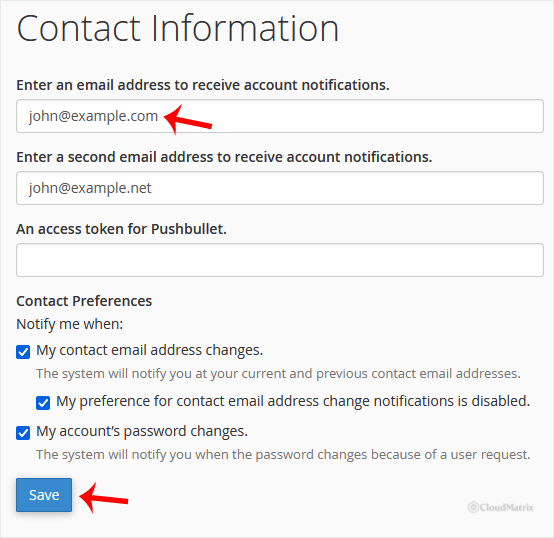
Your contact information is now updated, and cPanel will send notifications to the address you entered.
Use an Address Hosted Elsewhere
Set your contact address to a mailbox on a different provider, such as a Gmail or Outlook account, rather than an email address hosted on this cPanel account. If the account is ever suspended, or the mailbox fills up and stops accepting mail, cPanel's warnings would be delivered to an inbox you can no longer reach. That is exactly when you most need the alert, so keeping the contact address on a separate service means you still get the message in time to act.
Need a Hand?
If you are unsure which address to use, or you are not receiving notifications you expected, the Noiz support team can check your account settings for you. Open a support ticket from the Noiz client area and Noiz will take a look.






