A partial backup lets you download one specific part of your hosting account on its own, rather than a full backup of everything. This is the quickest way to grab a copy of just your website files, just your databases, or just your email routing, for example before you edit a site, migrate away, or hand a copy to a developer. cPanel's Backup Wizard offers three partial options: your Home Directory (all your website files), your MySQL Databases, and your Email Forwarders and Filters.
A partial backup is not the same as a full account backup. A full backup bundles everything into one large archive that cPanel prepares in the background, whereas a partial backup generates and downloads immediately to your computer. If you need a complete copy of the account instead, use the full backup option in the same Backup Wizard.
Last reviewed: 27 July 2026, against the current stable release of cPanel and WHM. This guide is written for Noiz hosting and is kept current against cPanel. It complements, and does not replace, the official cPanel documentation linked below.
Official Documentation Reference
Prerequisites
- Access to your cPanel account (your Noiz welcome email contains the login details).
- Enough free space on your own computer to hold the download. A Home Directory backup can be large if your site stores many files, images, or mailboxes.
Download a partial backup
1. Open the Backup Wizard
Log in to your cPanel account. In the Files section, click Backup Wizard.
2. Start a backup
Under Backup or Restore, click Back Up.
3. Choose which part to download
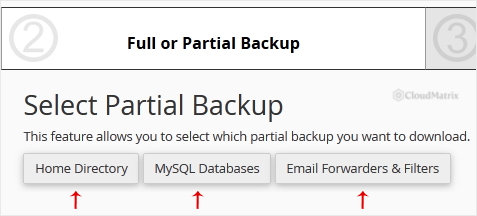
Under Select Partial Backup, choose the part you want to download:
- Home Directory downloads a single compressed archive (a
.tar.gzfile) containing all of your website files. Clicking it generates and begins the download straight away. - MySQL Databases lists each of your databases separately so you can download an individual database as a compressed
.sql.gzfile. - Email Forwarders and Filters lets you download your forwarder and filter configuration.
4. Download the file
Click Download (or the relevant item name) and save the file to your computer. Keep it somewhere safe; a backup is only useful if you can find it again when you need to restore.
Troubleshooting
The download seems to hang on a large site: a Home Directory backup is built on the fly, so a large account can take a while before the download begins. Give it time rather than clicking repeatedly. If the account is very large, a full backup (which cPanel prepares and stores first) is often the more reliable route.
You need to restore what you downloaded: the same Backup Wizard can restore a partial backup. Return to it, click Restore, then upload the archive for the part you want to put back.
Need a hand?
If you are on a managed Noiz plan and would prefer Noiz to take, verify, or restore a backup for you, contact the Noiz support team through the client area and the team will assist.






