Noiz
  • 0 Shopping Cart
  • Home
  • Store
    • Browse All
    • Shared
    • WordPress
    • Cloud
    • Domain
    • Software
    • Reseller
    • Support
    • Security
    • Dedicated
    • Register a New Domain
    • Transfer Domains to Us
  • Announcements
  • Knowledgebase
  • Network Status
  • Affiliates
  • Contact Us
  • More
  • Account
    • Login
    • Forgot Password?
  1. Portal Home
  2. Knowledgebase
  3. Plesk
  4. General (Plesk)
  5. How to Change the Plesk Account's Contact Details

  Categories

Backup & Restore
4
Billing
2
CloudLinux
10
cPanel
24
Databases
11
Domains
10
Email
18
FTP
9
General
3
ISPConfig
5
Linux
3
Mail Filters & SPAM
9
Mobile
11
Nextcloud
1
Other
3
Plesk
46
Security
11
Softaculous
70
SSL
5
Tutorials
2
WHM
13
WordPress
22

  Categories

  Tag Cloud

account address Admin affiliate api apple apple email setup guide apple mail setup guide Archive Authentication Autoresponder backups billing blog cli Cloud Compliance contact create cron cryptocurrency Dashboard debian Dedicated Deliverability DIGEST-MD5 directories disk space disk usage DKIM DMARC Docker domain domains Dovecot email email account setup email client emails error files Filtering form forward forwarder forwarding hosting imap inodes IPv6 ispconfig large mailboxes Limits linux list lists local log Login macbook mail mail setup mailbox microsoft migration monero mozilla name Nextcloud occ Office 2024 LTS open source outlook outlook alternative payment PCI Performance permissions pgp encryption Phishing PHPMyAdmin plesk pointing POPIA Private PST RAID register registration rest rsync saving scheduled search security Server set up setup softaculous Software spam SPF Spoofing Storage support thunderbird TLS tools transfer troubleshooting tutorial Ubuntu User website whois Windows WordPress wp wp-cron.php

  Support

My Support Tickets
Announcements
Knowledgebase
Downloads
Network Status
Open Ticket

How to Change the Plesk Account's Contact Details Print

  • 0


Follow these steps to change your Plesk account's contact details.


1. Log in to your Plesk account.


2. Click on Account from the Sidebar Menu.
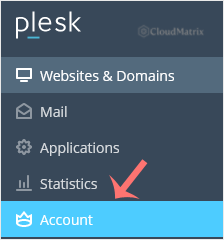
plesk-click-on-account-client.gif


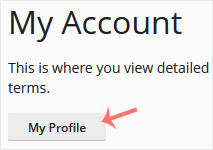
3. Click on My Profile.

plesk-myprofile-client.gif


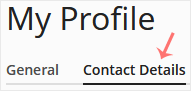
4. Click on Contact Details.

plesk-client-contact-details-tab.gif


5. Update the details as per your requirements.
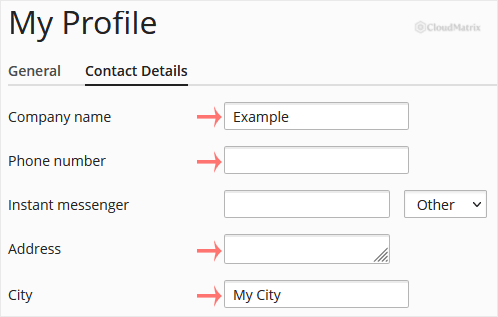
plesk-client-myprofile-modify-contact-details.gif


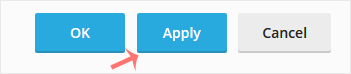
6. Click Apply.

plesk-apply-client.gif


You will see a success message signifying that your Plesk contact details have changed.


Was this answer helpful?

Related Articles

How to Edit a File in the Plesk File Manager   1. Log in to your Plesk account. 2. Click on Files from the Sidebar Menu.   3. Under File... How to Change the Password of a Plesk Account   Follow these steps to change your Plesk account password.   1. Log in to your Plesk account.... How to Reset a Plesk's Account Password   Follow these steps to reset your Plesk account password.   1. Open your Plesk login URL.... How to Update a Plesk Account's Email Address   Follow these steps to change your Plesk contact email address.   1. Log in to your Plesk... How to Change the Language of a Plesk Panel   Follow these steps to change the language of the Plesk Panel.   1. Log in to your Plesk...
« Back

  Tag Cloud

account address Admin affiliate api apple apple email setup guide apple mail setup guide Archive Authentication Autoresponder backups billing blog cli Cloud Compliance contact create cron cryptocurrency Dashboard debian Dedicated Deliverability DIGEST-MD5 directories disk space disk usage DKIM DMARC Docker domain domains Dovecot email email account setup email client emails error files Filtering form forward forwarder forwarding hosting imap inodes IPv6 ispconfig large mailboxes Limits linux list lists local log Login macbook mail mail setup mailbox microsoft migration monero mozilla name Nextcloud occ Office 2024 LTS open source outlook outlook alternative payment PCI Performance permissions pgp encryption Phishing PHPMyAdmin plesk pointing POPIA Private PST RAID register registration rest rsync saving scheduled search security Server set up setup softaculous Software spam SPF Spoofing Storage support thunderbird TLS tools transfer troubleshooting tutorial Ubuntu User website whois Windows WordPress wp wp-cron.php

  Support

My Support Tickets
Announcements
Knowledgebase
Downloads
Network Status
Open Ticket
  • Contact Us
  • Terms of Service

Copyright © 2026 Noiz. All Rights Reserved.


Loading...
Loading...
Choose language
العربية
Azerbaijani
Català
中文
Hrvatski
Čeština
Dansk
Nederlands
English
Estonian
Persian
Français
Deutsch
עברית
Magyar
Italiano
Macedonian
Norwegian
Português
Português
Română
Русский
Español
Svenska
Türkçe
Українська

Choose Currency

R ZAR
€ EUR

Generate Password

Please enter a number between 8 and 64 for the password length